Beyond `LIKE`: Full-Text and Fuzzy Search in ZenStack V3

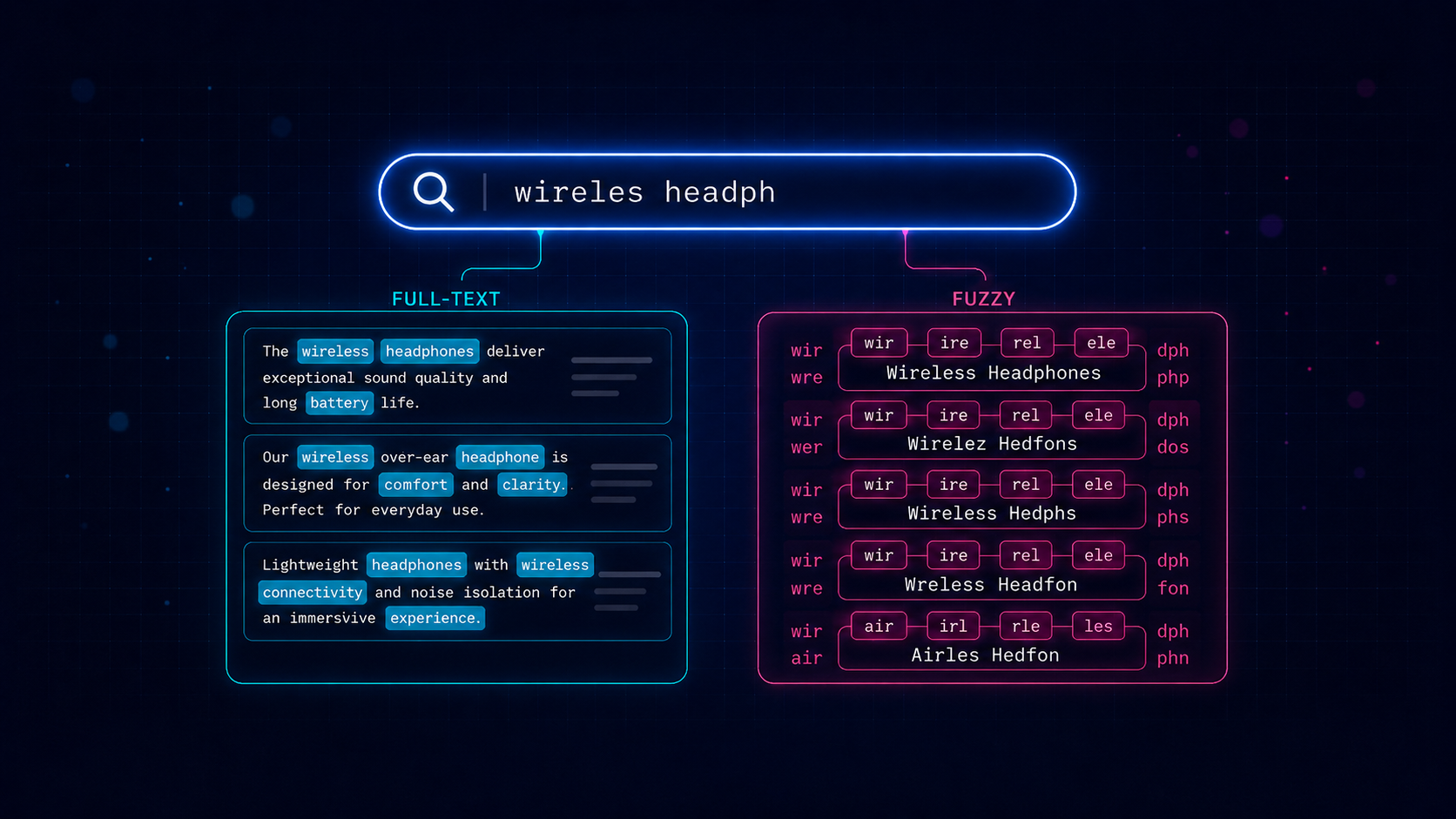
Every ORM gives you contains, startsWith, and endsWith on string fields, and for a while that feels like enough. Then a product manager asks for "search that just works" on a product catalog, and you realize how blunt those operators really are. contains: 'iphone' won't match "iPhones". It won't match "iphne" from a sloppy mobile keyboard. It won't rank a name match higher than a description match. And once your table gets large enough, ILIKE '%term%' quietly stops being free.
ZenStack v3.7 ships two new operators that solve different halves of this problem — full-text search for natural-language content and fuzzy search for short, typo-prone fields — both expressed in the same familiar ORM query API you're already using.
These features are supported for PostgreSQL only for now.
Two operators, two jobs
The two features are not interchangeable. They solve genuinely different problems, and picking the wrong one will produce frustrating results.
| Full-text search | Fuzzy search | |
|---|---|---|
| Backed by | to_tsvector / to_tsquery | pg_trgm extension |
| Schema attribute | @fullText | @fuzzy |
| Filter operator | fts | fuzzy |
| Relevance sorting key | _ftsRelevance | _fuzzyRelevance |
| Best for | natural-language text | short, identifier-like fields |
| Typo tolerance | ✗ | ✓ |
| Language-aware (stemming, stop words) | ✓ | ✗ |
A rough mental model: reach for full-text search when you're searching paragraphs of prose where words matter — descriptions, articles, reviews. Reach for fuzzy search when you're searching short identifier-like fields where characters matter — names, brands, SKUs, tags.
Both features are PostgreSQL-only for now, since they're built on Postgres-native machinery.
To make the rest of this post concrete, we'll use a small e-commerce product catalog:
model Product {
  id          Int     @id @default(autoincrement())
  name        String  @fuzzy
  brand       String  @fuzzy
  description String  @fullText
  sku         String  @unique
}
name and brand are short, user-typed, and prone to typos — perfect candidates for @fuzzy. description is prose that benefits from stemming and word-level matching — that's @fullText territory.
Full-text search
Full-text search tokenizes text into lexemes, applies language-aware stemming and stop-word removal, and matches against a structured query. "Running shoes" matches a description that contains "run", and a search for "the best" doesn't waste time matching the word "the" in every row.
Mark a String field with @fullText and use the fts operator:
// Find products whose description mentions "wireless"
await db.product.findMany({
  where: { description: { fts: { search: 'wireless' } } },
});
The search value is passed directly to Postgres to_tsquery, so the full tsquery syntax is available — boolean composition, negation, and adjacency:
// AND — both terms must appear
await db.product.findMany({
  where: { description: { fts: { search: 'wireless & noise-cancelling' } } },
});

// OR — either term
await db.product.findMany({
  where: { description: { fts: { search: 'leather | canvas' } } },
});

// NOT — exclude a term
await db.product.findMany({
  where: { description: { fts: { search: 'phone & !refurbished' } } },
});

// Adjacent words in order — "quick brown" as a phrase
await db.product.findMany({
  where: { description: { fts: { search: 'quick <-> brown' } } },
});
Stemming via config
The optional config field selects the Postgres text-search configuration used to tokenize both the document and the query. 'english' enables stemming (so 'run' matches "running"); 'simple' does literal token matching:
// 'run' matches "running", "runs", "runner" — stemmed
await db.product.findMany({
  where: { description: { fts: { search: 'run', config: 'english' } } },
});

// 'run' does NOT match "running" — literal only
await db.product.findMany({
  where: { description: { fts: { search: 'run', config: 'simple' } } },
});
If you leave config off, Postgres falls back to the cluster's default_text_search_config.
Ranking results
A filter tells you whether a row matches; for natural-language search you usually also want to know how well. The _ftsRelevance orderBy key compiles to ts_rank and lets you sort by match quality:
await db.product.findMany({
  where: { description: { fts: { search: 'wireless & headphones' } } },
  orderBy: {
    _ftsRelevance: {
      fields: ['description'],
      search: 'wireless & headphones',
      sort: 'desc',
    },
  },
});
fields can list multiple columns; ZenStack ranks against the concatenated document (via concat_ws), so a multi-field rank is straightforward:
orderBy: {
  _ftsRelevance: {
    fields: ['name', 'description'],
    search: 'wireless',
    sort: 'desc',
  },
}
A note on indexes
By default, Postgres computes to_tsvector(...) for every row on every query. For production workloads, add a GIN index on the fields you search. ZenStack does not yet emit these from the schema — add them via a raw SQL migration (zen migrate dev --create-only then edit the generated file):
CREATE INDEX product_description_fts_idx
  ON "Product"
  USING GIN (to_tsvector('english', "description"));
The index expression must match the query expression exactly — same configuration, same column list, same concat_ws shape for multi-field ranks.
Fuzzy search
Full-text search is powerful, but it has one stubborn limitation: it does not tolerate typos. A user searching for "iphne" will get nothing, even though the catalog is full of iPhones. That's where fuzzy search comes in.
Fuzzy search compares strings by trigram similarity — overlapping three-character sequences — so it matches even when the input and the stored value don't line up character-for-character. It's backed by Postgres's pg_trgm extension, which you need to enable once:
CREATE EXTENSION IF NOT EXISTS pg_trgm;
CREATE EXTENSION IF NOT EXISTS unaccent; -- only if you use unaccent: true
Mark a field with @fuzzy and use the fuzzy operator:
// finds "iPhone 15" despite the missing letter
await db.product.findMany({
  where: { name: { fuzzy: { search: 'iphne' } } },
});

// finds "Bose QuietComfort" with transposed letters
await db.product.findMany({
  where: { name: { fuzzy: { search: 'Qiuet Comfort' } } },
});
Modes
The mode option controls how the search string is compared:
'simple'(default) — compares against the whole field withsimilarity(). Best for short fields like names.'word'— approximate substring matching withword_similarity(). Finds the search term inside a longer field.'strictWord'— like'word'but withstrict_word_similarity(), which favors matches at word boundaries.
// 'word' mode: find products whose name *contains* something like "wireless"
await db.product.findMany({
  where: { name: { fuzzy: { mode: 'word', search: 'wireles' } } },
});

// 'strictWord' mode: prefer word-boundary matches
await db.product.findMany({
  where: { brand: { fuzzy: { mode: 'strictWord', search: 'Sony' } } },
});
Tuning with threshold
The threshold option sets the minimum similarity (strictly greater than) for a row to match — a number in [0, 1], where higher is stricter:
// strict: only near-exact matches
await db.product.findMany({
  where: { name: { fuzzy: { search: 'iPhone', threshold: 0.9 } } },
});

// permissive: useful for early-typing autocomplete
await db.product.findMany({
  where: { name: { fuzzy: { search: 'iP', threshold: 0.05 } } },
});
If you omit threshold, Postgres's session defaults apply.
Accent-insensitive matching
By default, fuzzy search is accent-sensitive — 'creme' won't match 'Crème brûlée'. Set unaccent: true to fold accents away before comparing:
await db.product.findMany({
  where: { name: { fuzzy: { search: 'creme', unaccent: true } } },
});
This requires the unaccent extension to be installed.
Ranking by closeness
Just like full-text search, fuzzy search has a relevance sort key — _fuzzyRelevance — so you can order results by how close they are to the input string:
await db.product.findMany({
  where: { name: { fuzzy: { search: 'iphne' } } },
  orderBy: {
    _fuzzyRelevance: {
      fields: ['name'],
      search: 'iphne',
      sort: 'desc',
    },
  },
});
When multiple fields are listed, ZenStack ranks against the best-matching field via GREATEST(similarity(...), similarity(...)) — handy for autocomplete that should match either a product name or its brand.
Indexes
Without an index, Postgres computes trigram similarity for every row on every query. For production, add a GIN index with the gin_trgm_ops operator class:
CREATE INDEX product_name_trgm_idx
  ON "Product"
  USING GIN ("name" gin_trgm_ops);

-- If you use unaccent: true, index the unaccent() expression
-- so Postgres can still use the index
CREATE INDEX product_name_unaccent_trgm_idx
  ON "Product"
  USING GIN (unaccent("name") gin_trgm_ops);
Putting it together
The two operators compose with everything else in the query API, so you can build a "search bar that just works" experience pretty easily. For example, a product search that fuzzy-matches on name or brand, full-text-matches on the description, and ranks by name similarity:
const q = 'wireles headphons';

await db.product.findMany({
  where: {
    OR: [
      { name: { fuzzy: { mode: 'word', search: q } } },
      { brand: { fuzzy: { mode: 'word', search: q } } },
      { description: { fts: { search: q.split(/\s+/).join(' & ') } } },
    ],
  },
  orderBy: {
    _fuzzyRelevance: { fields: ['name', 'brand'], search: q, sort: 'desc' },
  },
  take: 20,
});
A single query, fully typed, expressed in the ORM API — no raw SQL, no separate search service, no rebuilding an Elasticsearch index on every write.
Wrapping up
Both @fullText and @fuzzy are available now in ZenStack v3.7. They're Postgres-only for the moment. If you want to dig deeper, the reference docs are here:
As always, feedback and bug reports are very welcome — file an issue at zenstackhq/zenstack or drop into our Discord.